

Production Grade N8N Deployment on Kubernetes
Introduction to n8n
N8N is an open source workflow automation platform that allows organizations to connect applications, services, databases, APIs, and infrastructure components through automated workflows. It provides a visual workflow designer where users build automation pipelines using nodes, where each node performs a specific task such as reading data, calling APIs, sending notifications, processing files, or interacting with cloud services. Unlike traditional automation tools, n8n supports custom JavaScript, API integrations, and extensibility, making it suitable for both simple and advanced automation use cases.
Why We Use n8n
Organizations use n8n to automate repetitive tasks, reduce manual effort, and integrate systems without building custom integration services. Common use cases include:
• Automating ticket creation from emails
• Syncing data between applications
• Sending alerts and notifications
• Processing files and documents
• Managing infrastructure tasks
• Integrating AI services and workflows
• Automating approval workflows
• Monitoring alerts and DevOps automation
• Kubernetes and cloud resource automation
• Backup and deployment workflows
Read More: Why N8N Matters for Modern Businesses: Benefits, Use Cases & ROI Explained
Why Deploy n8n on Kubernetes
Kubernetes provides a production ready environment for running n8n because it offers high availability, self healing, scaling, rolling updates, and resource management. In Kubernetes, failed pods are automatically restarted and workloads can scale based on demand. It also integrates easily with PostgreSQL, Redis, ingress controllers, and secret management tools, making it ideal for enterprise deployments.
Production Architecture Overview
A production n8n deployment uses Queue Mode architecture instead of a single pod setup to properly separate workload responsibilities and improve system stability. This architecture separates responsibilities so that main n8n pods are responsible for handling the user interface, API requests, and workflow orchestration, while Worker pods are responsible for executing workflows asynchronously by consuming jobs from the Redis queue, ensuring heavy processing does not impact the main application. Webhook pods handle incoming external HTTP requests and triggers, allowing fast and isolated processing of inbound events.
PostgreSQL is used as the primary database to store workflows, credentials, and execution history in a persistent and consistent manner. Redis acts as the queue layer between the main and worker pods, temporarily holding workflow jobs until workers pick them up for execution. An ingress controller is used to expose the application securely to external users. This overall design improves scalability, performance, and reliability in production environments.
Prerequisites
Before starting the deployment, the environment should be properly prepared. A running Kubernetes cluster with kubectl access is required. A domain name should be available for secure external access. An ingress controller such as Traefik or a Gateway API implementation like Envoy Gateway should already be installed. A PostgreSQL database, either managed or self-hosted, and a Redis instance must also be available. Finally, cert-manager is recommended for managing TLS certificates and enabling secure HTTPS communication.
Deploying PostgreSQL Database
PostgreSQL is a core dependency for n8n because it stores all workflows, execution data, and configuration in a persistent and reliable way. It ensures data consistency and prevents loss of information during scaling, restarts, or failures, making it essential for production deployments.
First, create a namespace and verify storage class availability.
kubectl create namespace n8nkubectl get sc
Then add the Helm repository and update it.
helm repo add bitnami https://charts.bitnami.com/bitnamihelm repo updateCreate PostgreSQL secret:
kubectl create secret generic postgres-secret \ --from-literal=postgres-password='postgres123' \ --from-literal=password='n8n123' \ -n n8nkubectl get secret postgres-secret -n n8nCreate PostgreSQL values file:
auth: existingSecret: postgres-secret secretKeys: adminPasswordKey: postgres-password userPasswordKey: password username: n8n database: n8nprimary: persistence: enabled: true size: 20Gi storageClass: ebs-scInstall PostgreSQL using Helm:
helm install postgres bitnami/postgresql \ -n n8n \ -f postgres-values.yamlFinally verify deployment:
kubectl get pods -n n8nkubectl get pvc -n n8nAt this stage, PostgreSQL should be running and storage should be successfully bound as show in image.

PostgreSQL will expose a service usually postgres-postgresql as show in above image which will be used as a POSTGRESDB_HOST in the n8n configuration.
Deploying Redis (Queue Backend)
Redis is a core component in production n8n deployments when using Queue Mode. It acts as a high-speed in-memory message broker (queue system) between the n8n main instance and worker pods. When a workflow triggered, the job is pushed into Redis, and worker pods continuously pull tasks from Redis to execute them. This decouples execution from the main application and improves scalability, reliability, and performance. This allows the main n8n instance to remain lightweight while worker pods handle execution independently.
Create Redis secret:
kubectl create secret generic redis-secret \ --from-literal=redis-password='redis123' \ -n n8nkubectl get secret redis-secret -n n8nCreate Redis values file:
auth: enabled: true existingSecret: redis-secret existingSecretPasswordKey: redis-passwordmaster: persistence: enabled: true storageClass: ebs-sc size: 5Gireplica: persistence: enabled: true storageClass: ebs-sc size: 5GiInstall Redis using Helm:
helm install redis bitnami/redis \ -n n8n \ -f redis-values.yamlVerify Redis deployment:
kubectl get pods -n n8nkubectl get svc -n n8nkubectl get pvc -n n8n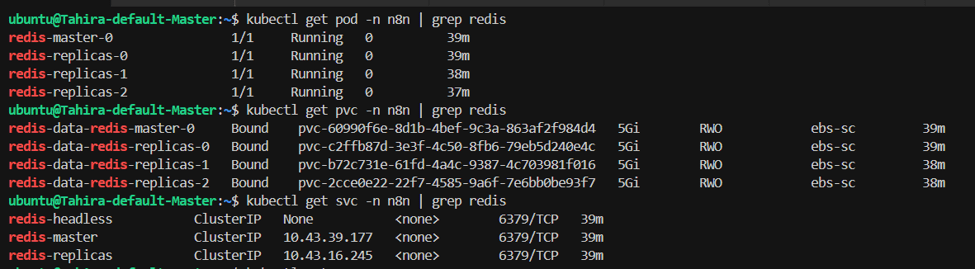
Redis will expose a service usually redis-master as show in above image which will be used as a REDIS_HOST in the n8n configuration.
Deploying n8n
Helm simplifies deployment and lifecycle management of Kubernetes applications. In production, PostgreSQL and Redis should ideally be external or highly available services for better reliability. n8n must run in Queue Mode so that workflow execution is separated from the main application layer. In the values file, we define separate configurations for main, worker, and webhook pods to support this architecture, where the main pod handles the application interface and API, worker pods process workflow executions asynchronously from Redis queue jobs, and webhook pods manage incoming external triggers independently for improved scalability and isolation.
Create secret for n8n encryption key:
# Generate encryption key

N8N_KEY=$(openssl rand -hex 32)

# Verify generated key

echo "Generated Key: $N8N_KEY"

# Create Kubernetes Secret

kubectl create secret generic n8n-encryption-key \

  --from-literal=key="$N8N_KEY" \

  -n n8n

Create a values file for n8n deployment.

main:

  replicaCount: 1

  resources:

    requests:

      cpu: "300m"

      memory: "768Mi"

    limits:

      cpu: "1000m"

      memory: "1.5Gi"

  config:

    DB_TYPE: postgresdb

    DB_POSTGRESDB_HOST: postgres-postgresql

    DB_POSTGRESDB_PORT: 5432

    DB_POSTGRESDB_DATABASE: n8n

    DB_POSTGRESDB_USER: n8n

    EXECUTIONS_MODE: queue

    QUEUE_BULL_REDIS_HOST: redis-master

    QUEUE_BULL_REDIS_PORT: 6379

    QUEUE_BULL_REDIS_DB: 0

    N8N_HOST: n8n.yourdomain.com

    N8N_PROTOCOL: https

    WEBHOOK_URL: https://n8n.yourdomain.com

    N8N_PORT: "5678"

    GENERIC_TIMEZONE: Asia/Karachi

  extraEnv:

    - name: DB_POSTGRESDB_PASSWORD

      valueFrom:

        secretKeyRef:

          name: postgres-secret

          key: password

    - name: N8N_ENCRYPTION_KEY

      valueFrom:

        secretKeyRef:

          name: n8n-encryption-key

          key: key

    - name: QUEUE_BULL_REDIS_PASSWORD

      valueFrom:

        secretKeyRef:

          name: redis-secret

          key: redis-password

    - name: N8N_RUNNERS_ENABLED

      value: "true"

    - name: N8N_PORT

      value: "5678"

webhook:

  enabled: true

  replicaCount: 2

  extraEnv:

    - name: DB_POSTGRESDB_HOST

      value: postgres-postgresql

    - name: DB_POSTGRESDB_PORT

      value: "5432"

    - name: DB_POSTGRESDB_DATABASE

      value: n8n

    - name: DB_POSTGRESDB_USER

      value: n8n

    - name: DB_POSTGRESDB_PASSWORD

      valueFrom:

        secretKeyRef:

          name: postgres-secret

          key: password

    - name: N8N_ENCRYPTION_KEY

      valueFrom:

        secretKeyRef:

          name: n8n-encryption-key

          key: key

    - name: QUEUE_BULL_REDIS_PASSWORD

      valueFrom:

        secretKeyRef:

          name: redis-secret

          key: redis-password

    - name: N8N_PORT

      value: "5678"

worker:

  enabled: true

  replicaCount: 3

  resources:

    requests:

      cpu: "300m"

      memory: "768Mi"

    limits:

      cpu: "1500m"

      memory: "2Gi"

  extraEnv:

    - name: DB_POSTGRESDB_HOST

      value: postgres-postgresql

    - name: DB_POSTGRESDB_PORT

      value: "5432"

    - name: DB_POSTGRESDB_DATABASE

      value: n8n

    - name: DB_POSTGRESDB_USER

      value: n8n

    - name: DB_POSTGRESDB_PASSWORD

      valueFrom:

        secretKeyRef:

          name: postgres-secret

          key: password

    - name: N8N_ENCRYPTION_KEY

      valueFrom:

        secretKeyRef:

          name: n8n-encryption-key

          key: key

    - name: QUEUE_BULL_REDIS_PASSWORD

      valueFrom:

        secretKeyRef:

          name: redis-secret

          key: redis-password

    - name: N8N_RUNNERS_ENABLED

      value: "true"

    - name: N8N_PORT

      value: "5678"

  livenessProbe: null

  readinessProbe: null

service:

  type: ClusterIP

persistence:

  enabled: true

  storageClass: ebs-sc

  size: 10Gi

Replace n8n.yourdomain.com with your actual domain name.

Install n8n using Helm:

helm install n8n \

  oci://8gears.container-registry.com/library/n8n \

  -n n8n \

  -f n8n-values.yaml

Verify n8n deployment:

kubectl get pods -n n8n

kubectl get svc -n n8n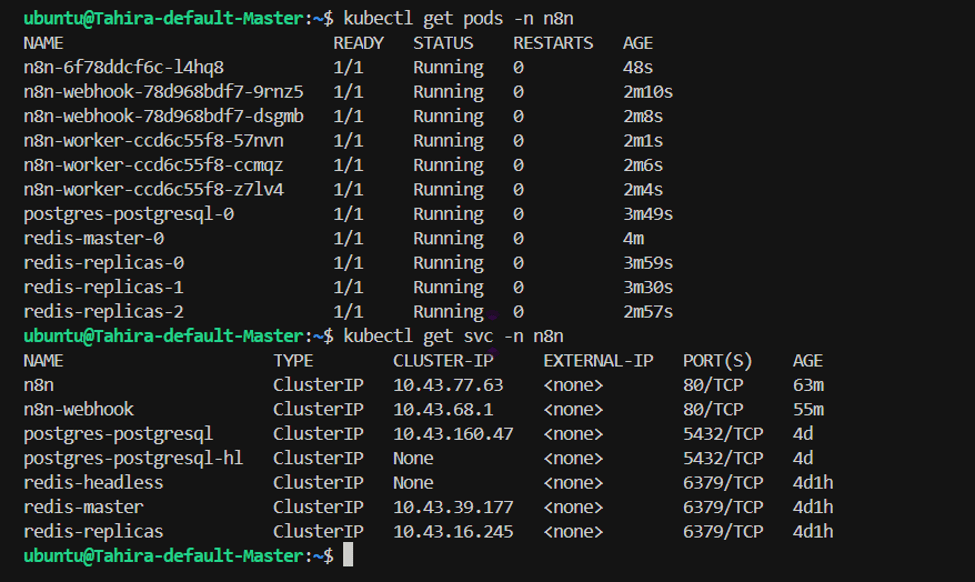
External Access Using Gateway API and HTTPRoute
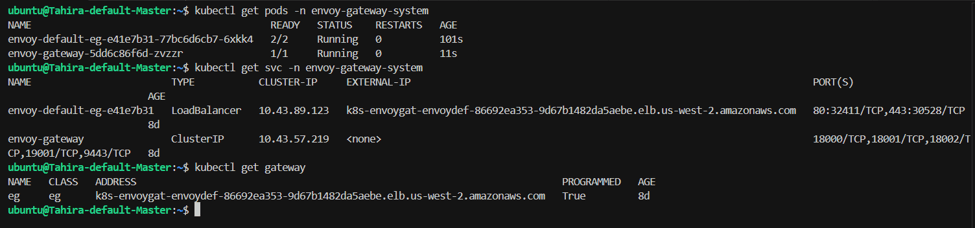
To expose n8n to the internet, Envoy Gateway is installed in the Kubernetes cluster as a Gateway API controller. A hostname like n8n.company.com is used, and DNS is pointed to the cluster load balancer. Envoy Gateway receives external traffic on the ports defined in the Gateway and forwards it inside the cluster based on rules defined in the HTTPRoute. The Gateway defines how traffic enters the cluster, while the HTTPRoute defines where the traffic should go, such as the n8n service. For production, TLS should be enabled using cert-manager with Let’s Encrypt to secure communication over HTTPS.
Verify Gateway Api
Verify Service Name
kubectl get svc -n n8n
Create file httproute.yaml
apiVersion: gateway.networking.k8s.io/v1

kind: HTTPRoute

metadata:

  name: n8n-route

  namespace: n8n

spec:

  parentRefs:

    - name: eg

      namespace: default

  hostnames:

    - n8n.yourdomain.com

  rules:

    - matches:

        - path:

            type: PathPrefix

            value: /

      backendRefs:

        - name: n8n

          port: 80

kubectl apply -f httproute.yaml
Verify HTTP route
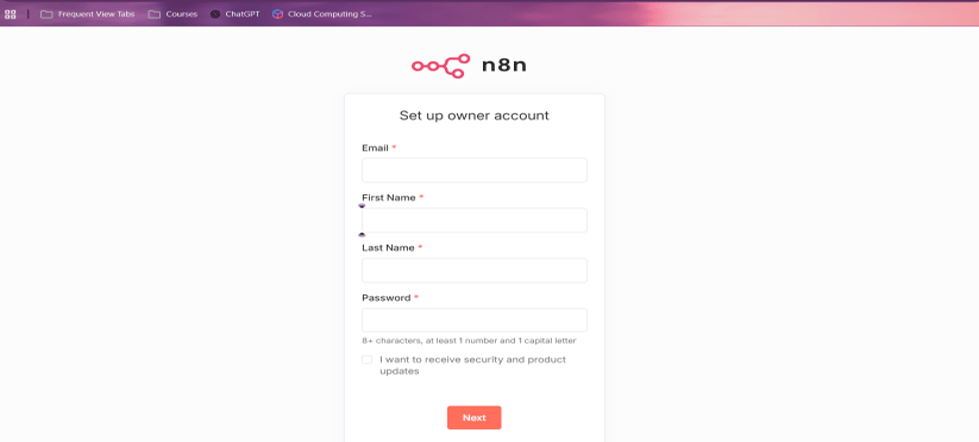
kubectl get httproute -n n8nVerify via domain in browser
Autoscaling Strategies
Kubernetes allows scaling based on workload demand. In n8n, worker pods should be scaled dynamically because they handle workflow execution from a Redis queue. The Horizontal Pod Autoscaler can be used for CPU and memory based scaling, but it is not ideal for queue driven systems because CPU usage does not always reflect pending work. In n8n, jobs can accumulate in the Redis queue while CPU usage remains low because workers are idle until they pick up tasks. This means HPA may react late or not scale at all during high queue pressure. A better strategy in such cases is event driven autoscaling using KEDA, which provides more accurate scaling behavior for asynchronous workloads.
KEDA Deployment
KEDA is more efficient in this scenario because it scales based on Redis queue depth, which directly represents the actual workload waiting to be processed. When the queue size increases, KEDA automatically increases the number of worker pods, and when the queue becomes empty or decreases, it scales them back down. This makes scaling faster, more accurate, and better aligned with real workload demand compared to CPU based autoscaling. This scaling is applied only to the n8n worker deployment, not the main n8n application. The main pods remain fixed because they handle the UI and API layer, which are not workload queue based and do not require dynamic scaling.
Note: KEDA automatically creates and manages a Kubernetes HPA and feeds it external metrics like Redis queue depth. The HPA then uses these metrics to scale worker pods dynamically in real time based on workload demand.
Add Helm Repo
helm repo add kedacore https://kedacore.github.io/charts helm repo update Install KEDA using Helm
helm install keda kedacore/keda \ --namespace keda \ --create-namespace Verify KEDA Installation
kubectl get pods -n keda 
Trigger Authentication
Create a Trigger Authentication resource. This resource allows KEDA to access the Redis password stored in the Kubernetes secret and use it for authentication when monitoring the Redis queue.
Create file trigger-auth.yaml
apiVersion: keda.sh/v1alpha1

kind: TriggerAuthentication

metadata:

  name: redis-auth

  namespace: n8n

spec:

  secretTargetRef:

    - parameter: password

      name: redis-secret

      key: redis-password

Apply TriggerAuthentication

kubectl apply -f trigger-auth.yaml
Scaled Object
In this step, we will create a Scaled Object that is responsible for scaling n8n worker pods up and down based on the queue workload. Before creating the ScaledObject, verify the number of running worker pods.
kubectl get pods -n n8n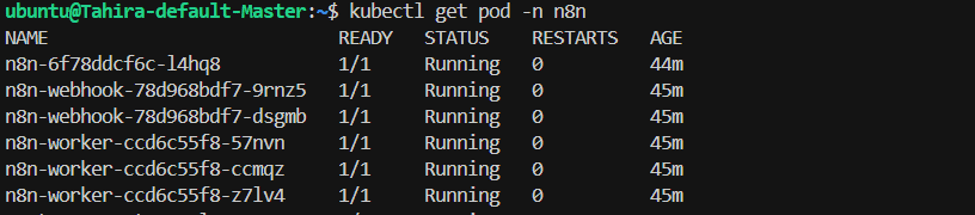
According to the output, 3 worker pods are currently running.
Create file keda-scaledobject.yaml
apiVersion: keda.sh/v1alpha1

kind: ScaledObject

metadata:

  name: n8n-worker-scaledobject

  namespace: n8n

spec:

  scaleTargetRef:

    name: n8n-worker

  minReplicaCount: 1

  maxReplicaCount: 7

  pollingInterval: 10

  cooldownPeriod: 30

  triggers:

    - type: redis

      metadata:

        address: redis-master.n8n.svc.cluster.local:6379

        listName: bull

        listLength: "5"

      authenticationRef:

        name: redis-auth
Apply ScaledObject
kubectl apply -f keda-scaledobject.yaml Verification for ScaledObject
kubectl get scaledobject -n n8n 
kubectl get pods -n n8n
Current Scaling Status
After enabling KEDA autoscaling, the n8n deployment is now running with replicas based on the configured scaling rules.
Now we can verify that earlier we had 3 worker pods, but now only 1 worker pod is running because the load is low. KEDA has scaled it down based on current demand and is maintaining the minimum replica value defined in the ScaledObject.
High Availability and Reliability
A production setup should always avoid single points of failure. Multiple replicas of n8n should run across nodes, and worker pods should be distributed across availability zones. Pod Disruption Budgets should be configured to ensure availability during maintenance. PostgreSQL and Redis should be deployed in high availability mode with persistent volumes (PV) to ensure data durability, along with proper backup and disaster recovery planning.
Conclusion
n8n is a powerful workflow automation platform that becomes even more powerful when deployed on Kubernetes. With Helm-based deployment, it gains scalability, self healing, and high availability. A production grade setup should always include Queue Mode architecture, external PostgreSQL and Redis, secure ingress with TLS, autoscaling using KEDA, and proper monitoring. Redis plays a key role as the high-speed queue layer that connects the main application with worker pods, ensuring fast, reliable, and scalable workflow execution. This ensures a fully production ready, resilient, and enterprise grade automation platform.