

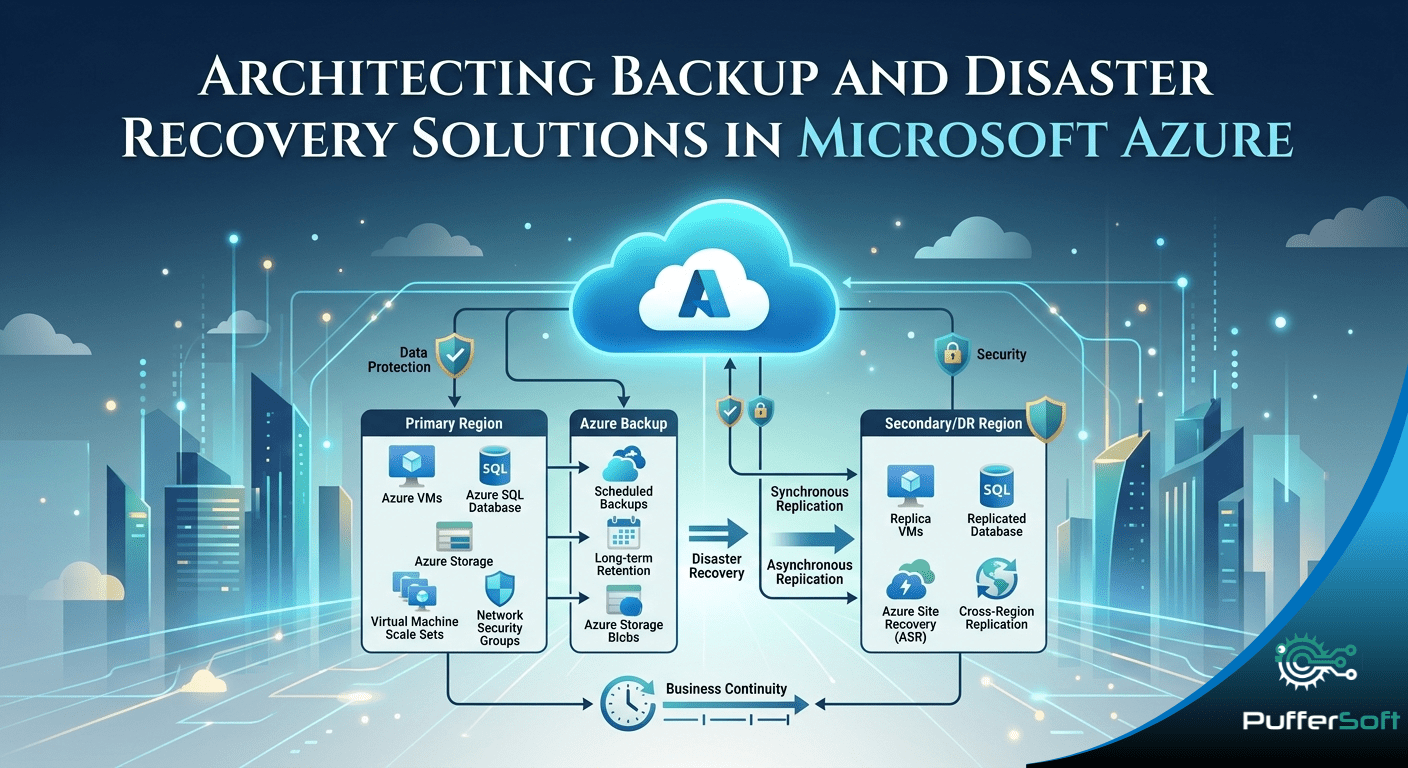
Architecting Backup and Disaster Recovery Solutions in Microsoft Azure
In today’s digital-first world, data is one of the most critical assets for any organization. Ensuring its protection, availability, and rapid recovery is essential for maintaining business continuity. A well-architected backup and disaster recovery (BDR) solution in Microsoft Azure empowers organizations to protect workloads, reduce downtime, and recover quickly from unexpected disruptions.
With robust, scalable, and secure cloud-native services, Azure provides everything needed to build a resilient data protection strategy.
What is Backup and Disaster Recovery?
Although often used interchangeably, backup and disaster recovery serve distinct purposes:
- Backup focuses on creating secure copies of data to protect against accidental deletion, corruption, or cyber threats like ransomware.
- Disaster Recovery (DR) ensures that applications and systems remain operational or can be restored quickly during major outages such as infrastructure failures or regional disruptions.
In Microsoft Azure, these capabilities are delivered through two core services:
- Azure Backup
- Azure Site Recovery
Together, they form a comprehensive resilience strategy.
Azure Backup: Secure and Scalable Data Protection
Azure Backup is a cloud-native solution designed for automated, secure, and cost-effective data protection.
Key Features:
- Wide Workload Support
Protects Azure Virtual Machines, SQL databases, file shares, and on-premises systems. - Centralized Management
Backup configurations are managed through a Recovery Services Vault, enabling easy policy control and monitoring. - Incremental Backups
Reduces storage consumption and cost by only storing changes. - Advanced Security
Includes encryption, soft delete, and backup immutability to protect against accidental or malicious deletion. - Geo-Redundant Storage (GRS)
Ensures high durability and availability even during regional failures.
Benefits:
- Reduced operational overhead
- Enhanced data security
- Cost-efficient long-term retention
Azure Site Recovery: Business Continuity and Failover
Azure Site Recovery (ASR) enables seamless disaster recovery by replicating workloads across regions or from on-premises environments to Azure.
Core Capabilities:
- Cross-Region Replication
Ensures business continuity during regional outages. - Planned and Unplanned Failovers
Supports both maintenance scenarios and emergency recovery. - Automated Recovery Plans
Enables orchestration of multi-tier applications for smooth failover. - Minimal Downtime
Ensures fast recovery with low Recovery Time Objectives (RTO).
Why It Matters:
Azure Site Recovery minimizes business disruption and ensures critical applications remain accessible during failures.
Best Practices for Azure Backup and Disaster Recovery
Designing an effective BDR strategy requires careful planning and alignment with business goals.
1. Define RPO and RTO
- Recovery Point Objective (RPO): Maximum acceptable data loss
- Recovery Time Objective (RTO): Maximum acceptable downtime
These metrics guide your backup frequency and recovery strategy.
2. Classify Workloads by Criticality
Categorize applications based on their importance to the business:
- Mission-critical systems → High-frequency backups + DR replication
- Non-critical workloads → Cost-optimized backup strategies
3. Implement Multi-Region Redundancy
Leverage Azure’s global infrastructure to:
- Improve availability
- Reduce risk of regional failures
- Enhance disaster resilience
Security in Backup and Disaster Recovery
Security is a fundamental component of any BDR solution.
Azure Security Features:
- Role-Based Access Control (RBAC)
- Multi-Factor Authentication (MFA)
- Encryption at Rest and in Transit
- Soft Delete & Immutable Backups
Additionally, tools like Azure Monitor and Log Analytics provide real-time monitoring and alerting to detect anomalies and threats early.
Cost Optimization Strategies
Managing costs effectively is crucial for long-term sustainability.
Optimization Techniques:
- Use incremental backups to minimize storage usage
- Choose appropriate storage tiers
- Define efficient retention policies
- Align backup frequency with business requirements
A well-optimized strategy ensures maximum protection without unnecessary expenses.
Testing and Validation: The Missing Piece
Many organizations overlook testing—but it is critical.
Key Practices:
- Perform regular test failovers using Azure Site Recovery
- Validate backup restoration processes
- Simulate real-world disaster scenarios
This ensures your recovery plan works when it matters most.
Why Choose Puffersoft for Azure BDR Solutions?
At Puffersoft, we specialize in delivering secure, scalable, and resilient cloud architectures on Microsoft Azure.
Our Approach:
- Align BDR strategies with business objectives
- Implement industry best practices
- Ensure high availability and performance
- Provide end-to-end DevOps and cloud support
We help organizations build infrastructure that is not just functional but future-ready.
Conclusion
Architecting a robust backup and disaster recovery solution in Microsoft Azure requires the right combination of tools, strategy, and best practices.
By leveraging Azure Backup and Azure Site Recovery, organizations can:
- Protect critical data
- Ensure business continuity
- Minimize downtime
- Respond effectively to disruptions
In an increasingly cloud-driven world, a well-designed BDR strategy is not optional it is essential for maintaining trust, reliability, and operational stability.