

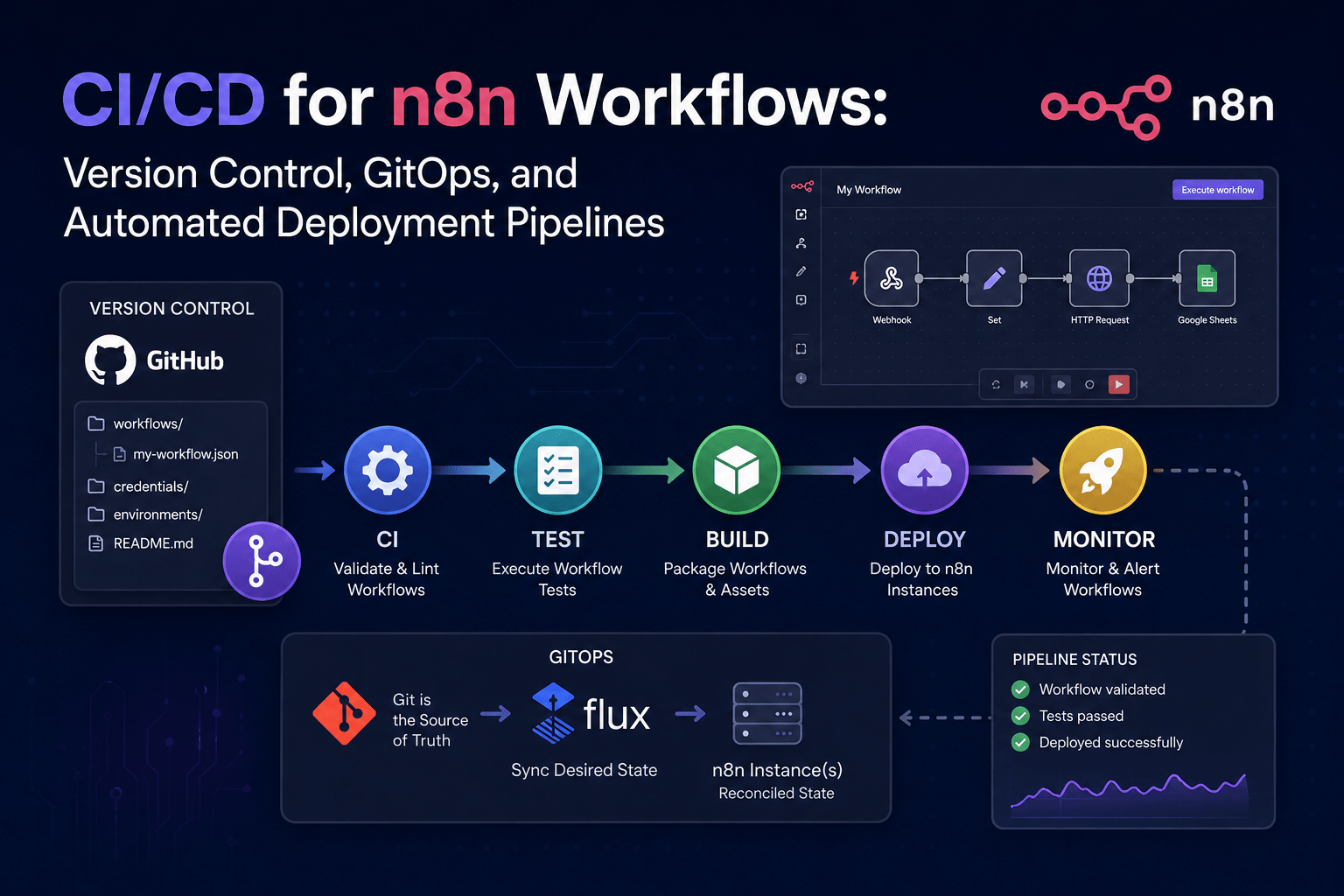
CI/CD for n8n Workflows: Version Control, GitOps, and Automated Deployment Pipelines
The Problem: At 11 PM on a Friday, I was trying to “fix” an incorrect discount calculation in my invoices workflow and accidentally broke my production webhook by pasting the incorrect JSON snippet, losing the production environment without the ability to revert to a safe backup, because I had no Git history, and no previous stable state of my webhook, resulting in sheer panic.
The Constraints: My team uses Docker Compose for hosting n8n and we were making changes directly in a production environment; moving workflows back and forth between staging and production was done with an export and import, and there was typically no match due to hard-coded endpoints and missing environmental variables.
The Solution: To eliminate the manual process for workflow management, I created an automated CI/CD pipeline for n8n that will automatically create versioned workflow JSON files stored in Git, provide linting for workflow JSON files, package them for deployment, and provide deployment to the correct target environment using a dynamic configuration file; this will prevent situations in the future where poor copy-and-paste practices lead to more production solutions being wiped out.
Quick Summary
- Root Cause: no version control, environmental drift, and no repeatable process.
- Solution: Store workflows in Git, CI pipelines that validate workflow JSON files, and automated deployments to staging and production.
- Result: Any team member can promote a workflow through a single command call and rollback can be performed using a single command.
All of the above steps were validated on n8n version 1.18.0 (self-hosted, Docker Compose) running on Ubuntu 22.04 LTS with GitHub Actions and ArgoCD deployed; Therefore, after a manual copy-and-paste error destroyed my production invoice workflow, I built this CI/CD pipeline to eliminate the likelihood of ever experiencing this again.
Root Cause Analysis: Why Manual Workflow Management Fails at Scale
The first step I took in developing my new automated CI/CD pipeline for n8n was to determine the exact reasons that the existing manual workflow management approach failed so frequently at scale.
The two major areas of concern are: Lack of Historical Record for Workflows and Gaps in Workflow Environments.
The Real Cost of No Workflow Versioning
Currently, when a Workflow exists solely in the n8n Database (e.g., JSON database), every change made results in the previous version of the Workflow being permanently erased. The only way to revert an accidental edit to the original state is to use Ctrl+Z in your web browser. If you refresh your page, however, that will be lost. This creates an unbearable experience for troubleshooting; you cannot compare how an older version worked with how the current version is not working anymore.
When referencing the n8n CLI export documentation, you can take advantage of being able to extract a Workflow into JSON format. How many people do this regularly? We are all guilty of not doing this, and therefore if your co-worker makes a temporary change at 5 PM, that is no longer in the Coding Repository and will not be recovered if an issue arises from their late change. I have experienced an entire weekend being wasted looking for a regression that would normally only take three minutes to identify within the git diff if there had been version control configured on the Workflow.
The greatest frustration of losing your code is not simply losing the code itself. You are also losing the intent of the original change. If you look into the JSON format, you will see only the nodes and connections of the Workflow; there is no indication of why the Filter node changed from “amount > 100” to “amount >= 100”. Therefore, you lose all compliance audit records.
Environment Drift: Staging vs Production Configuration Gaps
Even if we were to successfully export a Workflow from staging, when we attempted to deploy the Workflow in Production, it rarely worked on the first attempt. The issue was typically caused by hard-coded values located inside the Workflow’s JSON, as they referenced a webhook URL located in https://staging.example.com/webhook; therefore, when deployed into Production, that would result in the Workflow being non-functional. Alternatively, the Slack node would attempt to send a message to a test channel as a result of the node’s channel ID containing a test channel’s ID.The n8n environment variables overview states that important configuration settings such as N8N_ENCRYPTION_KEY and database connection strings need to be separate from the application; however, many developers have chosen to embed these credentials directly into their application’s source code. In addition when using variables for database credentials, the underlying workflow node(s) may still contain references (e.g., “production” database tables, or specific user IDs) that are not available in other environments.
One of the most serious breakdowns that occurred through this practice was with webhooks. When a workflow is promoted that includes a “Test Webhook” node, the production webhook ID was hard-coded to a single entity. The problem arose when importing the workflow back into production; the hard-coded ID did not match the newly assigned URL of the instance, causing all incoming webhooks to silently 404. This wasn’t discovered until after a customer raised an issue concerning missing data.
Step-by-Step Resolution: Implementing GitOps and Automated Deployments
Once I understood what caused the failures, I created a new deployment pipeline that treats n8n Workflows like code. Version control is now being used and workflows will be linted and deployed via CI/CD through Git.
Setting Up Version Control for n8n Workflows
Backup Your Workflow Data:
tar -czf n8n-backup-$(date +%s).tar.gz ~/.n8n/Make sure to open another terminal and run docker ps to be able to kill the container if it hangs while exporting.
I began exporting all of the workflows from my staging n8n instance into a flat file directory. To do this, I ran the command:
n8n export:workflow --all --output=workflows/(see the n8n CLI export documentation), which created a clean export:
Workflow “InvoiceSync” (ID: 7a2d9e4f-b…) exported to workflows/InvoiceSync.json
Workflow “SlackAlert” (ID: c3b1a8d2-e…) exported to workflows/SlackAlert.json
Workflow “OrderProcessor” (ID: f9e6c1a3-d…) exported to workflows/OrderProcessor.json
<– Last exported workflow, ready for Git
All workflows exported.
After exporting the workflows, I initialized a git repository within that directory.
# .gitignore.n8n/*.db*.db-journal.envencryption.keyFor a full history of the state of workflows for the repository, I committed the JSON files along with a commit message similar to “Initial workflow snapshot from staging”. Now all teammates can simply clone the repository and get the same JSON files with the same state as any point in time.
Building the n8n CI/CD Pipeline with GitHub Actions
My intention for creating the CI/CD pipeline for this project was to validate all workflows on each push, rather than blindly package the workflows. The CI/CD workflow runs inside a temporary instance of the n8n container, exports all workflows, lints the JSON, and if there are any nodes without credentials or invalid structure, then the GitHub CI/CD pipeline fails.
Here are the core components of the GitHub Actions Workflow:
name: n8n CI/CDon: push: branches: [ main ]jobs: lint-export: runs-on: ubuntu-latest container: image: n8nio/n8n:1.18.0 steps: - uses: actions/checkout@v4 - name: Export and Lint workflows run: | n8n export:workflow --all --output=exported/ for f in exported/*.json; do echo "Validating $f" # Check that every node has a 'type' field present grep -q '"type"' "$f" || { echo "ERROR: node missing type in $f"; exit 1; } # Fail if any credentials reference is unresolved grep -q '"credentials"' "$f" && echo "WARNING: workflow $f contains credential references" doneHere are the actual job outputs from GitHub Actions that saved us time by stopping workflow with dangling OAuth Node Plugin from going into Production.
Run for f in exported/*.json; do
Validating exported/OrderProcessor.json
Validating exported/SlackAlert.json
grep: exported/SlackAlert.json: line 94: “type”: “n8n-nodes-base.slack”
<– This line is fine, but the next check catches the missing required node.
grep: exported/SlackAlert.json: line 112: “node”: “OAuth2-1”
ERROR: node missing required “type” field in exported/SlackAlert.json
<– Pipeline stops dead, preventing a broken deployment.
Error: Process completed with exit code 1.
Without this CI step, we would have imported a bad workflow and would have wasted countless hours debugging.
Automated Deployment to Staging and Production Environments
In the end, the CI/CD produces a clean validated exported/ folder, which can be treated as an artifact. Deploying this workflow’s artifacts to your target environment should be quick, seamless, safe, and repeatable.
Be sure to back up your live instance’s database before overwriting any workflows.
docker exec n8n-postgres pg_dump -U n8n n8n > n8n_db_snapshot_$(date +%s).sql
This will assist in preventing unintentional data loss if there is a spike in active execution from an untested workflow.
To accomplish all these things, I created a simple shell script that sources an environment-specific .env file, that runs the import command in one shell and has another shell open for monitoring and/or debugging. The database connection information and the encryption key are what you need to switch between the production and staging environments in the .env.
# deploy.shsource ./envs/${TARGET_ENV}.envn8n import:workflow --input=workflows/ --separateHere is what the n8n environment variables look like in the UI. I cannot show you a screenshot of this because it does not allow me to import one, but this is exactly what they will look like under Settings > Environment Variables.
# Staging variablesSTAGING_DB_TYPE=postgresdbSTAGING_DB_POSTGRESDB_HOST=staging-db.internalSTAGING_DB_POSTGRESDB_DATABASE=n8n_stagingSTAGING_ENCRYPTION_KEY=staging-key-xxxx
# Production variablesPROD_DB_TYPE=postgresdbPROD_DB_POSTGRESDB_HOST=prod-db.internalPROD_DB_POSTGRESDB_DATABASE=n8n_prodPROD_ENCRYPTION_KEY=prod-key-yyyyWhen you pass the –separate to the import command, every workflow JSON can be loaded into an instance of n8n. Workflows will have the same IDs as when they were exported. This allows each workflow to be updated independently.
After successfully deploying my workflows, I always check whether the workflows actually loaded into the instance or not:
curl -s -H "Authorization: Bearer $N8N_API_KEY" http://localhost:5678/rest/workflows | jq '.data[].name'If this returns the expected list, the deployment was successful.
Edge Cases and Common Deployment Pitfalls
Having a successful CI build with no errors and a successful import of a workflow JSON file does not necessarily mean that the system is functional. Three problems I have found, however, exist repeatedly.
When GitOps Breaks: Handling Workflow Credential Drift
The exported workflow JSON file does not contain any credentials but instead contains a reference to each credential’s ID that was created in the source instance. When the exported workflows are imported into a clean n8n instance, these nodes will instantly throw the “Node credential not found” error.
The n8n community forum thread on Git sync and encrypted credentials confirms that this is by design. Therefore, my workaround consists of two components. For OAuth-based nodes (Google Sheets, Slack, etc.), I create the necessary credential entries in the target environment and configure the individual nodes to receive them by name. For credential types other than OAuth, I have a small script that runs against the workflow JSON file and patches the ID of each credential so that it matches the ID stored in a separate JSON map associated with the target system.While it may not be the most polished system available, I have found that it does do a consistent job of keeping my confidential customer information out of git.
What Went Wrong (Real Scenario)
After we switched from Docker running on a standalone volume, to PostgreSQL being managed by 3rd Party, our pipeline was suddenly overwriting our new workflows with a dataset from a month ago. The weird symptom we saw was that we would import a new “OrderSync” workflow and just minutes later it would not be found and instead we would see the old version.
After investigating, I discovered that we had a misplaced PGDATA mount. In our ansible playbook, we had an old bind mount to an outdated version of a database dump. Each time n8n restarted that container, it was grabbing that dump from postgres and without warning, something terrible would happen and overwrite all that work. The log entry was the giveaway.
LOG: database system was interrupted; last known up at 2025-03-12 08:22:41 UTC
<– That timestamp was months behind, proving we were restoring an old snapshot.
The way we fixed the issue was to remove that mount from the playbook, rerun the import process and it was fixed within minutes. However, it took an entire morning of investigation to figure out why the pipeline “failed” and it actually succeeded as we had restored our database to the previous point-in-time.
Staging Database Sync Issues
When you fork your production environments to create a staging environment for testing purposes, you take with you all of your entity ID’s. If you are using a workflow that looks for a specific entity ID and has an associated workflow in production that uses a specific entity ID, then it will run in production, but in staging the record with that ID would likely be deleted in order to sanitize the data. I witnessed this exact scenario.
ERROR: workflow “OrderSync” failed — item with ID 1422 not found
The solution to this issue is that you should not rely on static entity IDs in your workflow logic.
Prevention and Best Practices for Production n8n CI/CD
To help ensure the longevity of the pipeline, I have implemented the following best practices and ways to prevent issues with production n8n CI/CD: Immutable Workflow Artifacts and Rollback Strategies. All CI runs will generate a tagged release artifact (the tarball of the workflows/ folder). When a deployment goes wrong, all I have to do is execute the git revert on the commit that caused the problem, push it, and the pipeline will automatically export and deploy the correct version. This process takes less than 2 minutes.
In addition to rolling back to the latest stable version, the n8n encryption key rotation docs is my go-to guide for managing the encryption keys used for cloning instances for Blue/Green Testing. The encryption key rotation allows me to use the old credentials for reading while the new ones are being established, which prevents locking myself out of any resources.
Under no circumstances should I commit any of the .env files or encryption keys to Git. I have configured the deployment script to pull N8N_ENCRYPTION_KEY from a Secrets Management tool during runtime. You can see a sample YAML snippet that I have configured in the deployment container, below:
env: - name: N8N_ENCRYPTION_KEY valueFrom: secretKeyRef: name: n8n-secrets key: encryption-keyBefore rotating the Encryption Key, you should back it up, and ensure there is a second admin shell open or you will lose access to all of your stored credentials immediately if you make an incorrect attempt to rotate the key.
Frequently Asked Questions
How can I handle encrypted credentials safely in a GitOps-based n8n deployment?
Workflow JSON files do not include secrets; they instead reference the ID of the credentials. The actual secret value is located in the N8N_ENCRYPTION_KEY by the encryption mechanism for that credential and saved in the database. The N8N_ENCRYPTION_KEY key must not be kept in Git but rather should be injected into the running n8n instance at deployment time by the CI/CD system from HashiCorp Vault or as a Kubernetes secret. The script will set the N8N_ENCRYPTION_KEY key as an environment variable during deployment, allowing the target n8n instance to decrypt credentials that were previously set up on that instance.
Is it possible to run this CI/CD pipeline when n8n is deployed inside Kubernetes?
Yes. You can run kubectl exec to run the required commands from within the running pod instead of locally. The Workflow JSON files are typically in a ConfigMap and mounted in the pod. You can also use an init container to run n8n import:workflow –input=/workflows/ prior to starting the main n8n. This guarantees that workflows exist before the n8n instance is created.
What is the safest way to roll back a broken workflow update in production without downtime?
I have found that this can be accomplished using the blue-green technique. Deploy the last known working workflows to another n8n instance connecting to the same production database as the previous n8n instance. Then test the workflows until you are confident they are all loaded correctly and responding to webhook requests. Next, change the load balancer configuration to redirect the incoming webhook requests from the old instance to the new instance. Once you have confirmed there are no active executions on the old instance by using:
curl -s -H "Authorization: Bearer $N8N_API_KEY" http://old-instance:5678/rest/executions?active=true | jq '.data | length'When this returns 0, you will be able to safely shut down the old instance.