

Secure N8N Deployment on Kubernetes: TLS, Secrets & Hardening
Introduction
n8n is a highly versatile workflow automation solution connecting APIs, cloud infrastructure services, databases, and internally developed applications. Being deployed in Kubernetes clusters, n8n can access confidential information like API keys, OAuth tokens, database credentials, and webhooks payloads. While installing the platform by itself is an easy task, properly securing it for the production environment is another story entirely.
Teams frequently choose the default Kubernetes deployment configuration for n8n. This approach is acceptable, but it exposes workloads to several risks, like plain-text data transfer, weak secret storage, overly broad permissions of service accounts, and excessive pod-to-pod communications. Considering that automation solutions interact with important infrastructure and company data, these risks can easily translate into severe problems.
This problem required a multi-layered security model based on TLS, proper secrets storage, Role-based Access Control, and Kubernetes network policies. These measures allowed us to make n8n a fully-fledged and secure solution.
Why Default Deployments Are Risky
Kubernetes’s default configuration, while being more adaptable, is also much more insecure than a hardened one. “Open by default” means there will be no restrictions on communications between services, and they will happen via service accounts with overly generous permission sets.
In the case of n8n, this becomes an extremely serious problem, as without implementing proper protection measures, login requests, webhook notifications, and API interactions can be transmitted inside the cluster without using TLS. Moreover, credentials can be exposed in Kubernetes manifest files or CI/CD configurations.
Excessive permissions will enable any pod compromised by a hacker to gain access to many more cluster resources than necessary.
Secure N8N Architecture Overview
To mitigate these risks, our secure deployment architecture utilizes a Defence in Depth model. This approach focuses on protecting credentials, restricting permissions, and isolating communication through multiple security layers.
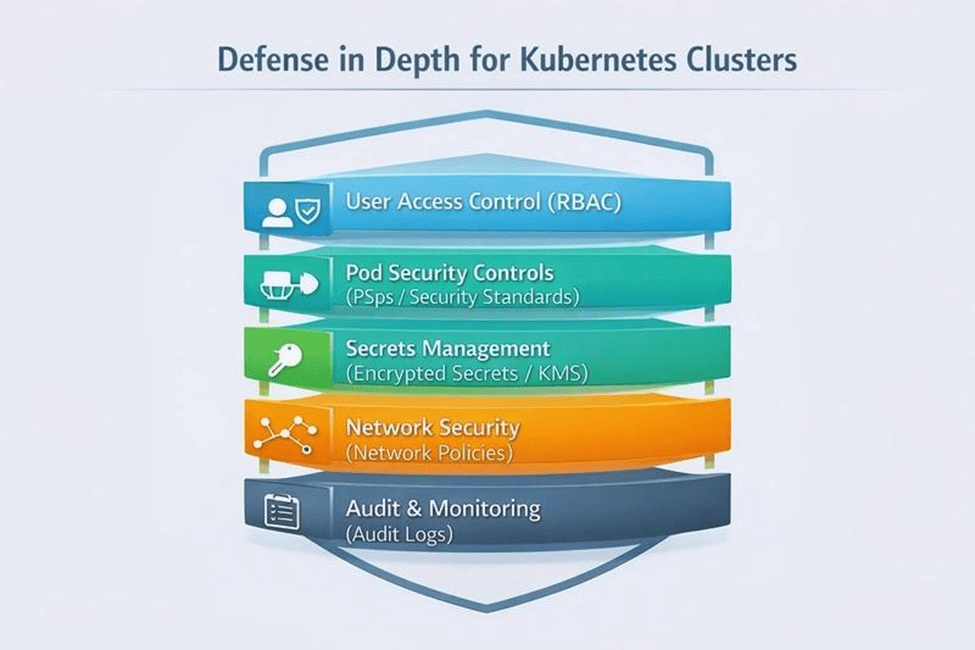
This multi-layered strategy includes:
- Traffic Encryption (TLS): All incoming traffic is processed by an NGINX Ingress Controller with TLS termination, ensuring data in transit is encrypted.
- Secrets Hardening: Credentials are moved out of the cluster and stored in a central manager (like AWS Secrets Manager), synced only when needed by the application.
- Least Privilege (RBAC): We utilize specific Kubernetes Service Accounts with minimal permissions to ensure n8n jobs cannot access unauthorized cluster resources.
- Network Isolation: Traffic is restricted via Network Policies, allowing n8n to communicate only with verified services like PostgreSQL, DNS, and trusted external APIs.
By implementing this layered approach, we significantly reduce the internal attack surface and ensure a production-ready, hardened environment.
TLS: Encrypting Application Traffic
Considering that n8n takes care of authentication sessions, webhooks, and API integrations, securing data in transit becomes important. Otherwise, without TLS, sensitive data might have been exposed in transit.
We secured the data by employing the NGINX Ingress Controller along with cert-manager and Let’s Encrypt for TLS support. The TLS termination was done on the ingress level to ensure that the traffic coming in was secured using HTTPS rather than HTTP. Moreover, the HTTP traffic was automatically redirected to HTTPS.
This allowed us to have strong encryption and made certificate management easier.
Secrets Management Beyond Kubernetes Secrets
Secrets management is a critical pillar of a hardened n8n environment. Because n8n orchestrates various services, it must store sensitive data, including:
- OAuth Credentials & API Tokens
- SMTP Passwords
- Database Credentials
- The N8N_ENCRYPTION_KEY
While native Kubernetes secrets provide a layer of abstraction, they are merely Base64 encoded by default. This makes them vulnerable to exposure through CI/CD logs, misconfigured RBAC permissions, or accidental manifest leaks.
The Solution: AWS Secrets Manager & External Secrets Operator (ESO)
To resolve this, we moved all sensitive data out of the cluster and into AWS Secrets Manager. We then implemented the External Secrets Operator (ESO) to bridge the gap.
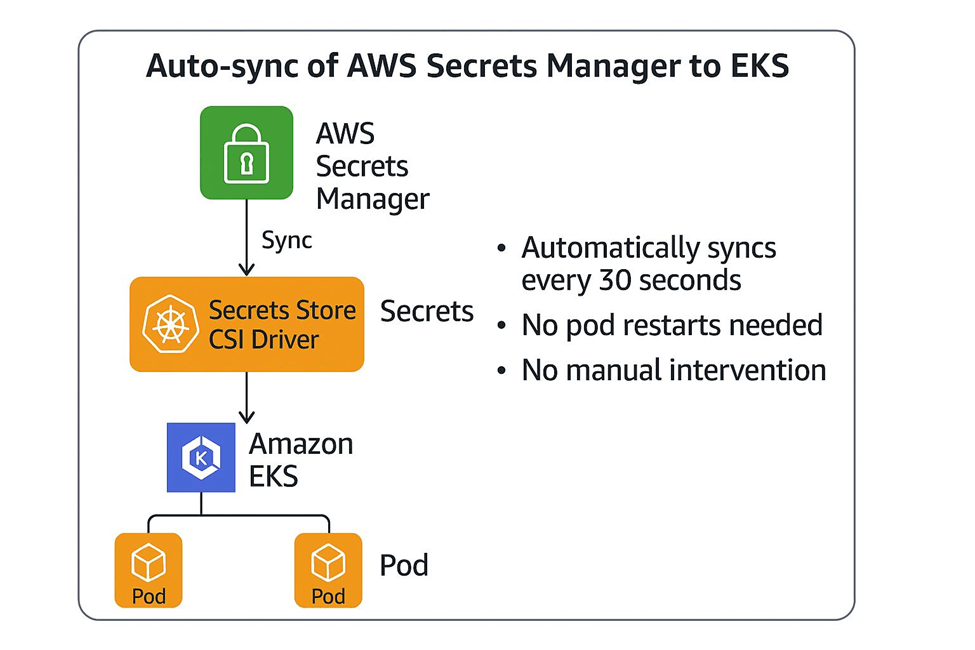
This workflow provides several security advantages:
- No Plain-Text Manifests: Credentials are never stored in Git or deployment files.
- Secure Synchronization: Secrets are only injected into the cluster environment when the application requires them.
- Simplified Auditing: All secret access is logged centrally within AWS, providing a clear audit trail for compliance.
A Critical Note on the N8N_ENCRYPTION_KEY
One of the most vital configurations is the N8N_ENCRYPTION_KEY. This key is used by n8n to encrypt credentials within its internal database. If this key is lost or changes (e.g., due to a pod restart without persistent configuration), your stored credentials will become unreadable, effectively breaking your workflows. Using ESO ensures this key remains persistent and secure across the entire lifecycle of your deployment.
RBAC and Least-Privilege Access
The other improvement that had a major impact was in restricting the permissions of Kubernetes using RBAC. Often, the default service account comes with more permissions than required.
In the case of n8n, however, this was not required. A compromised workload with high permissions may have been able to examine other workloads, read secrets, or communicate with other namespaces.
To mitigate this problem, we created a new Kubernetes Service Account that had minimal permissions to run n8n.
apiVersion: v1
kind: ServiceAccount
metadata:
  name: n8n-service-account
  namespace: automation
This enforced the principle of least privilege and significantly reduced the blast radius of a potential compromise.
Network Policies and Traffic Isolation
Even with TLS and RBAC configured properly, unrestricted network communication inside Kubernetes can still create major security gaps. By default, pods can communicate freely with one another, enabling lateral movement within the cluster.
To address this, we implemented Kubernetes Network Policies to strictly control traffic flow.
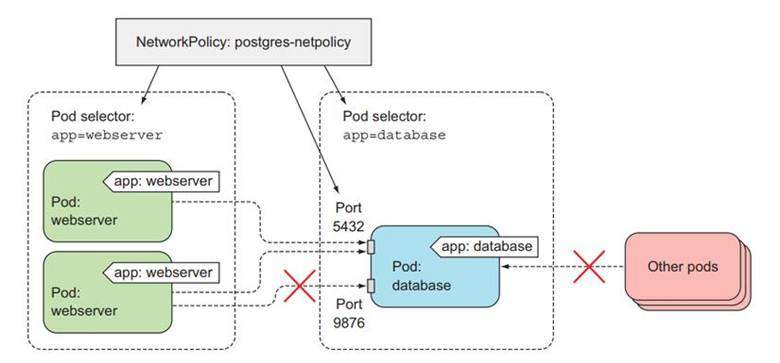
Our policy enforces strict traffic boundaries:
- Ingress Only: Access to the n8n pod is restricted exclusively to traffic originating from the NGNIX Ingress Controller.
- Egress Control: Outgoing communication from the n8n pod is locked down to only essential services: PostgreSQL (port 5432), DNS (port 53), and specific trusted external API endpoints.
- Default Deny: We apply a “deny-all” ingress and egress policy by default, ensuring only explicitly defined traffic is permitted.
This strategy significantly narrows the internal attack surface and ensures that n8n operates in a hardened, isolated environment.
Additional Hardening Best Practices
Beyond the primary security layers, we implemented several industry-standard hardening techniques to ensure a production-ready deployment:
- Non-Root Execution: We configured the n8n containers to run as non-root users to mitigate the risk of container escape vulnerabilities.
- Immutable File Systems: By limiting write permissions on the container file system, we prevent unauthorized changes to the application environment at runtime.
- Image Pinning: Instead of using the latest tag, we locked our images to specific, scanned versions to ensure consistency and prevent the introduction of unverified code.
- Production-Grade Database: We replaced the default SQLite setup with PostgreSQL for improved reliability and data integrity.
- Managed Infrastructure: Utilizing Amazon RDS allowed us to offload database encryption and automated backups to managed services, ensuring data is protected both at rest and in transit.
Conclusion
Kubernetes security demands a combination of several security layers. As n8n connects to workflow, credentials, and corporate systems, all production deployments of n8n must incorporate such elements as TLS encryption, secure secret management, RBAC policies, and Network Policies.
The use of all these methods will allow enterprises to establish a reliable n8n environment.
FAQ
Q: How do I back up encrypted credentials?
A: Back up your external PostgreSQL database (e.g., via RDS snapshots) and ensure your N8N_ENCRYPTION_KEY is securely stored in your central secrets manager. Both are required for a successful restore.
Q: What is the safest way to rotate the encryption key?
A: Key rotation is complex as n8n uses it to encrypt data at rest. Currently, the safest approach is to update the key in AWS Secrets Manager and perform a rolling restart, but ensure you have a database backup first in case of decryption errors.
Q: Can I use Pod Identity instead of static passwords?
A: Yes. Using IAM Roles for Service Accounts (IRSA) on EKS is the recommended best practice. It allows the n8n pod to authenticate with AWS services (like RDS or Secrets Manager) without needing any static credentials stored in the cluster.